

Gifts for Programmers: Desk Upgrades and Books Developers Respect
Programmers spend long days at the same desk, so the best gifts make that desk faster and kinder on the body: a mouse that flies through long files, a keyboard that spares the wrists, shortcuts on physical keys and one cable to the monitor. Add a book that explains what happens underneath the code, and you have a gift list developers will actually use.
Jump to the 10 picksMixed budgetsMixed
For ProgrammersFor Programmers
HandpickedHandpicked
Updated September 2026Updated
We'll tell you when not to buy something. Every pick below lists its honest catch, and we say who should skip it. We'd rather talk you out of the wrong gift than push you toward a sale — how we choose.
Our 10 picks
Save to PinterestBest overall
#1
A MagSpeed wheel that scrolls 1,000 lines a second and per-app buttons - the mouse for long files, logs and tab-heavy days.
The catch: It is right-handed only; Logitech now sells the newer MX Master 4, so the 3S is no longer the flagship; per-app customization needs Logi Options+ installed; and it is pricey for a mouse.
Best mechanical keyboard
#2
A compact wireless mechanical keyboard that switches between Mac and Windows - the satisfying daily driver.
The catch: The case is fairly tall, so many people add a wrist rest for long sessions, and there is no number pad.
Best for sore wrists
#3
A curved split keyboard with a cushioned wrist rest - for the programmer whose wrists are starting to complain.
The catch: The split, curved layout takes days or weeks to adjust to; it is large, with a number pad and built-in wrist rest; it uses replaceable batteries and the older Unifying receiver; there is no backlight; and its low-profile keys will not please mechanical-keyboard fans.
Best productivity gadget
#4
Eight LCD keys for builds, test runs, snippets and the meeting mute - repetitive clicks reduced to one press.
The catch: It has only 8 keys per page (the bigger Stream Decks cost more); it is wired only; Elgato lists no Linux support; and the Stream Deck app has to be running.
Best under $50
#5
Anker 555 USB-C Hub (8-in-1, A8383)
See price
A 4K monitor, Gigabit Ethernet and 85W charging through one USB-C cable - the laptop desk, sorted.
The catch: It drives only one external display; the extra USB-C port is data only; it passes through at most 85W, so power-hungry laptops charge slower; and the charger is not included.
Best book
#6
Petzold's classic on how computers work from circuits up - the book that fills in everything below the abstraction layer.
The catch: It is heavy on circuits and logic diagrams, so someone with a computer-engineering degree will know much of it; it explains hardware rather than teaching a language or tool; and the animations live on the companion website.
Also worth a look
#7
A monitor light bar that lights the desk without glare on the screen - kind to the eyes on late sessions.
The catch: It is expensive for a light, the wireless controller is slow to wake from sleep, the glossy controller shows fingerprints, and no cable is included for charging the controller.
Also worth a look
#8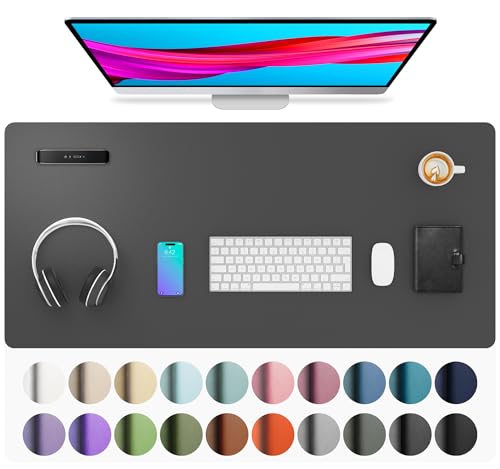
A large desk pad that gives the keyboard and mouse one smooth, tidy surface.
The catch: It arrives rolled and may need a day or two under weight to lie flat, it is synthetic PU leather rather than real leather, and sun and heat can fade or warp it.
Best side project
#9
A Raspberry Pi 5 kit for home servers, automation and the side project they keep mentioning.
The catch: It is a project, not a finished gadget - someone who wants a plug-and-play device will find it a chore. It also needs a monitor, keyboard and mouse for the first setup.
Also worth a look
#10
Keeps coffee at their chosen temperature through a long debugging session.
The catch: The battery holds temperature for a bit over an hour off the charging coaster, so it lives on its coaster at a desk - it is a desk mug, not a travel mug, and the price is steep for what is still a mug.
Still looking?
Search every pick on the site
The Gift Finder filters all our ideas by who it's for, the occasion, their interests and your budget.
Shopping by price: Under $25Under $50Under $100
How to choose
Improve the desk they sit at all day. Input devices, lighting and one-cable docking get used every hour of every working day.
Check their setup first. Mac or Windows, laptop or desktop, one monitor or two - it decides which keyboards, hubs and gadgets fit.
Take ergonomics seriously. Split keyboards and sculpted mice help people who type for a living, but expect an adjustment period.
Pick books that last. Concepts outlive frameworks; a classic like Code will still be relevant years from now.
Questions people ask
Gift etiquette
Not sure how much to spend?
Get a typical spending range for any relationship and occasion - and see what's actually expected.
The weekly email
One gift guide a week
Every Thursday: one hand-picked gift guide and the week's new finds, each with the honest catch. Unsubscribe in one click.
More gift guides you'll like
As an Amazon Associate we earn from qualifying purchases.