Keychron K2 Wireless Mechanical Keyboard (Brown Switches)
A compact 84-key mechanical keyboard with tactile brown switches that pairs with three devices over Bluetooth or plugs in by USB-C.
SplurgeCheck it out


CanaKit Raspberry Pi 5 Essentials Starter Kit (4GB)
Reviewed by the WhyToBuyThis team · Updated September 2026 · How we choose
Price: $189.99
Price may change on Amazon. As an Amazon Associate we earn from qualifying purchases. This won't cost you anything extra.
The Raspberry Pi is the credit-card-size computer tinkerers use for everything from ad blockers and home media servers to retro game consoles, weather stations and robots. The Pi 5 is the fastest yet, with a 2.4GHz quad-core processor and two micro HDMI outputs for dual 4K screens.
This CanaKit bundle pairs the 4GB board with the essentials to start - CanaKit's Essentials kits add a case, a proper USB-C power supply and a microSD card with Raspberry Pi OS already on it - so the first evening goes on the project, not on hunting for parts.
It is a project, not a finished gadget - someone who wants a plug-and-play device will find it a chore. It also needs a monitor, keyboard and mouse for the first setup.
Skip for someone who has no project in mind and no interest in tinkering.
| Board | Raspberry Pi 5, 4GB RAM |
|---|---|
| Processor | 2.4GHz quad-core Arm Cortex-A76 |
| Video | 2 micro HDMI ports, dual 4K |
| Wireless | Wi-Fi 5 and Bluetooth 5.0 |
| Ports | 2 x USB 3.0, 2 x USB 2.0, Gigabit Ethernet |
| Kit extras | Case, USB-C power supply, microSD card preloaded with Raspberry Pi OS, micro HDMI cable |
A compact 84-key mechanical keyboard with tactile brown switches that pairs with three devices over Bluetooth or plugs in by USB-C.
An Arduino-compatible board, breadboard, LEDs, sensors and a step-by-step tutorial - the cheapest way into electronics and coding hardware.
A small world globe that hovers and spins in midair inside a C-shaped frame, lit by LEDs - a desk gadget people can't stop staring at.
Nine touch-reactive smart light panels that snap together into wall art - 16 million colors, Wi-Fi and Thread, with Alexa and Google control.
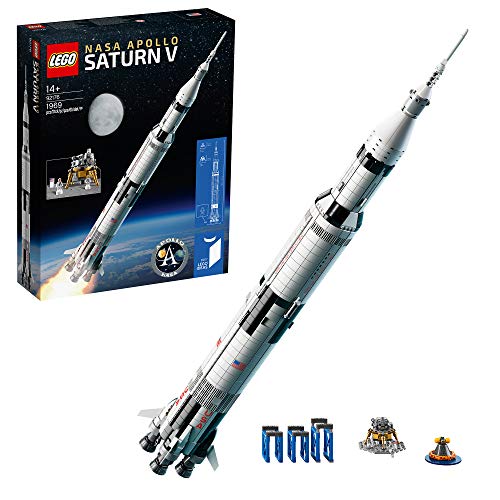
A 1,969-piece, 39-inch LEGO model of the Apollo moon rocket with removable stages, a lunar lander and display stands.
The xkcd creator answers absurd questions with real science and stick-figure drawings - a book geeks read out loud to whoever is nearby.
Gift etiquette
Get a typical spending range for any relationship and occasion - and see what's actually expected.
See the latest price and full details on Amazon.
As an Amazon Associate we earn from qualifying purchases. This won't cost you anything extra.